> ## Documentation Index
> Fetch the complete documentation index at: https://docs-dev-ai-docs-migration.mintlify.site/llms.txt
> Use this file to discover all available pages before exploring further.

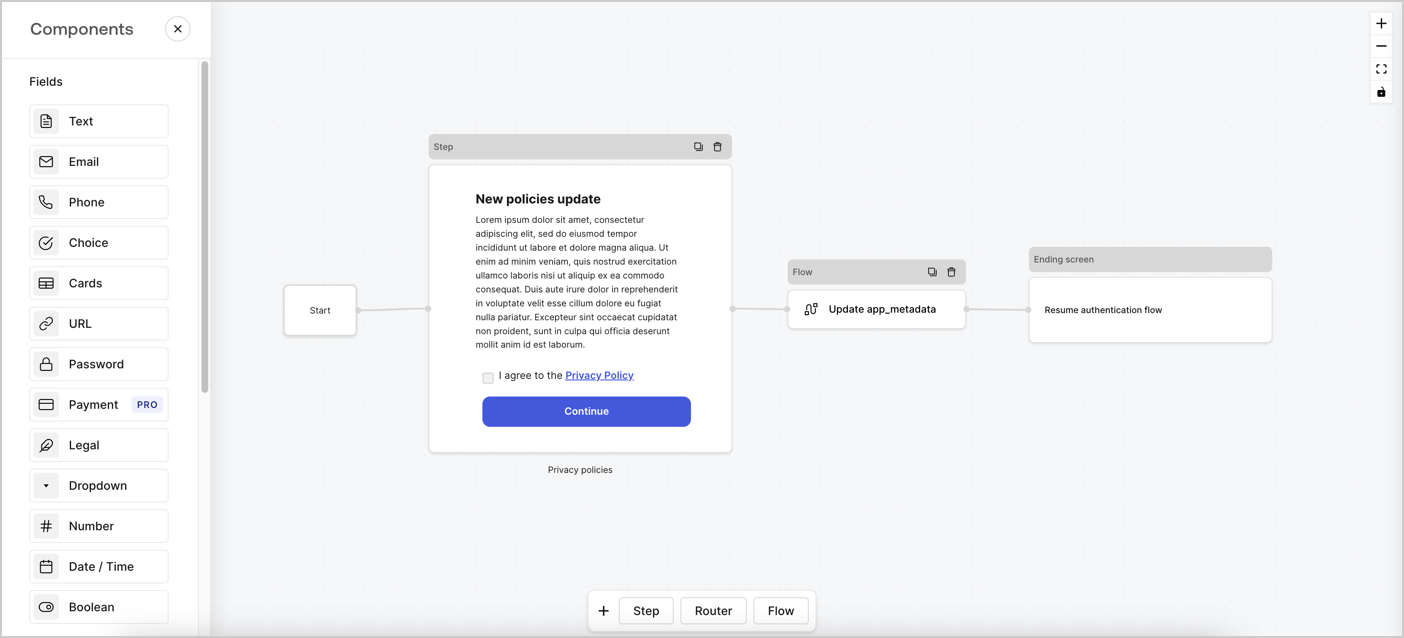
> Learn how to configure an update policy form using Forms for Actions for users to review and accept new terms of service or consent updates.

# Use Cases: Configure an update policy form using Forms

<Card title="Before you start">
  1. Create a [Machine-to-Machine Application](/docs/get-started/auth0-overview/create-applications/machine-to-machine-apps) with the following scopes enabled:

  * `read:users`
  * `update:users`
  * `create:users`
  * `read:users_app_metadata`
  * `update:users_app_metadata`
  * `create:users_app_metadata`

  2. Add a [Vault connection](/docs/customize/forms/vault) using the M2M application credentials.
</Card>

Forms for Actions allows you to create custom privacy policies flows and store the consent under the `app_metadata` object.
<Frame>
  <img src="https://mintcdn.com/docs-dev-ai-docs-migration/bWEivblcyEElh_dx/docs/images/cdy7uua7fh8z/6i68dMvHDTijfRmSgN1x8Q/ad900e7d4c0fb34645921435472b8684/privavy-policy-form.png?fit=max&auto=format&n=bWEivblcyEElh_dx&q=85&s=111f15c552547e42b003317981923873" alt="Dashboard > Actions > Forms > Privacy policy use case" data-og-width="1404" width="1404" data-og-height="638" height="638" data-path="docs/images/cdy7uua7fh8z/6i68dMvHDTijfRmSgN1x8Q/ad900e7d4c0fb34645921435472b8684/privavy-policy-form.png" data-optimize="true" data-opv="3" srcset="https://mintcdn.com/docs-dev-ai-docs-migration/bWEivblcyEElh_dx/docs/images/cdy7uua7fh8z/6i68dMvHDTijfRmSgN1x8Q/ad900e7d4c0fb34645921435472b8684/privavy-policy-form.png?w=280&fit=max&auto=format&n=bWEivblcyEElh_dx&q=85&s=36faeeb9dc38e90178bad9438fc441be 280w, https://mintcdn.com/docs-dev-ai-docs-migration/bWEivblcyEElh_dx/docs/images/cdy7uua7fh8z/6i68dMvHDTijfRmSgN1x8Q/ad900e7d4c0fb34645921435472b8684/privavy-policy-form.png?w=560&fit=max&auto=format&n=bWEivblcyEElh_dx&q=85&s=2bcb3ec5354dbcbc4eede4e8f54debb9 560w, https://mintcdn.com/docs-dev-ai-docs-migration/bWEivblcyEElh_dx/docs/images/cdy7uua7fh8z/6i68dMvHDTijfRmSgN1x8Q/ad900e7d4c0fb34645921435472b8684/privavy-policy-form.png?w=840&fit=max&auto=format&n=bWEivblcyEElh_dx&q=85&s=34e435c220aac6a5cdea470e44c1fca6 840w, https://mintcdn.com/docs-dev-ai-docs-migration/bWEivblcyEElh_dx/docs/images/cdy7uua7fh8z/6i68dMvHDTijfRmSgN1x8Q/ad900e7d4c0fb34645921435472b8684/privavy-policy-form.png?w=1100&fit=max&auto=format&n=bWEivblcyEElh_dx&q=85&s=5b461bd535552b6059cc07549cb6ddd8 1100w, https://mintcdn.com/docs-dev-ai-docs-migration/bWEivblcyEElh_dx/docs/images/cdy7uua7fh8z/6i68dMvHDTijfRmSgN1x8Q/ad900e7d4c0fb34645921435472b8684/privavy-policy-form.png?w=1650&fit=max&auto=format&n=bWEivblcyEElh_dx&q=85&s=57d7f4f6749b0822698531e0a28ec10d 1650w, https://mintcdn.com/docs-dev-ai-docs-migration/bWEivblcyEElh_dx/docs/images/cdy7uua7fh8z/6i68dMvHDTijfRmSgN1x8Q/ad900e7d4c0fb34645921435472b8684/privavy-policy-form.png?w=2500&fit=max&auto=format&n=bWEivblcyEElh_dx&q=85&s=b5852fb51ba0823035ba911f18fa6f4e 2500w" />
</Frame>

The sections below outline how you can create an Update Policy form using nodes and flows, along with steps for adding your form to a [Post Login](/docs/customize/actions/explore-triggers/signup-and-login-triggers/login-trigger) Action.

## Create a form from scratch

Follow these steps to create a form to gather information:

1. Open the Form editor by selecting **Auth0 Dashboard > Actions > Forms.**
2. Select **Create Form** > **Start from scratch**.

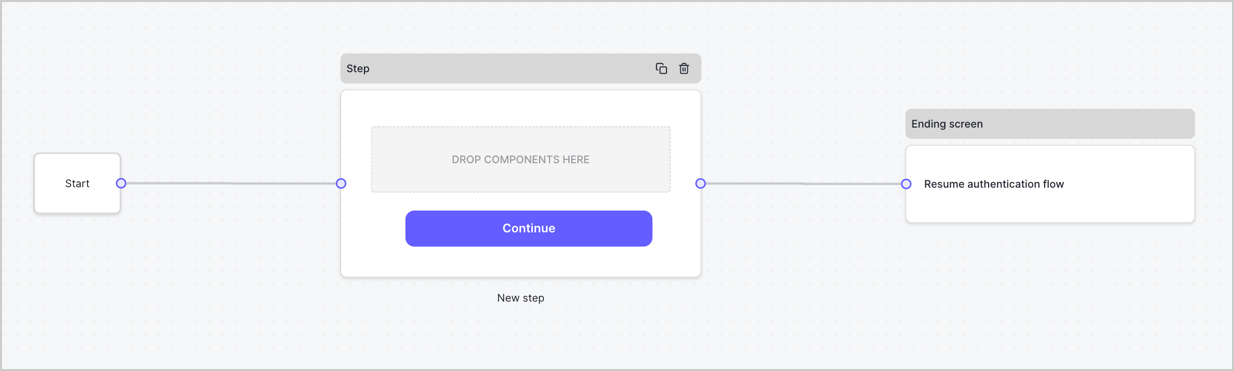
By default, a new form contains a Start node, a Step node, and an Ending screen node.
<Frame>
  <img src="https://mintcdn.com/docs-dev-ai-docs-migration/Qf1bRe1KVQBLsiEu/docs/images/cdy7uua7fh8z/2TZ9jSjgEcARFpULI6hz4R/a4319a1bd482f2ee5cc23100fdb2f42c/New-form-Forms-for-action-use-case.png?fit=max&auto=format&n=Qf1bRe1KVQBLsiEu&q=85&s=ef540d704ff05309c7a6f714dd49d592" alt="Dashboard > Forms > Use Cases > Form" data-og-width="1234" width="1234" data-og-height="371" height="371" data-path="docs/images/cdy7uua7fh8z/2TZ9jSjgEcARFpULI6hz4R/a4319a1bd482f2ee5cc23100fdb2f42c/New-form-Forms-for-action-use-case.png" data-optimize="true" data-opv="3" srcset="https://mintcdn.com/docs-dev-ai-docs-migration/Qf1bRe1KVQBLsiEu/docs/images/cdy7uua7fh8z/2TZ9jSjgEcARFpULI6hz4R/a4319a1bd482f2ee5cc23100fdb2f42c/New-form-Forms-for-action-use-case.png?w=280&fit=max&auto=format&n=Qf1bRe1KVQBLsiEu&q=85&s=badf0fbde10bc9bb4e3fd8ad866f79de 280w, https://mintcdn.com/docs-dev-ai-docs-migration/Qf1bRe1KVQBLsiEu/docs/images/cdy7uua7fh8z/2TZ9jSjgEcARFpULI6hz4R/a4319a1bd482f2ee5cc23100fdb2f42c/New-form-Forms-for-action-use-case.png?w=560&fit=max&auto=format&n=Qf1bRe1KVQBLsiEu&q=85&s=c1f81e339f98513598c1074412367c0f 560w, https://mintcdn.com/docs-dev-ai-docs-migration/Qf1bRe1KVQBLsiEu/docs/images/cdy7uua7fh8z/2TZ9jSjgEcARFpULI6hz4R/a4319a1bd482f2ee5cc23100fdb2f42c/New-form-Forms-for-action-use-case.png?w=840&fit=max&auto=format&n=Qf1bRe1KVQBLsiEu&q=85&s=1a2291e04a2f48c58e20cb8864c37218 840w, https://mintcdn.com/docs-dev-ai-docs-migration/Qf1bRe1KVQBLsiEu/docs/images/cdy7uua7fh8z/2TZ9jSjgEcARFpULI6hz4R/a4319a1bd482f2ee5cc23100fdb2f42c/New-form-Forms-for-action-use-case.png?w=1100&fit=max&auto=format&n=Qf1bRe1KVQBLsiEu&q=85&s=a87589cff4119bd251ec5caa64d6ff32 1100w, https://mintcdn.com/docs-dev-ai-docs-migration/Qf1bRe1KVQBLsiEu/docs/images/cdy7uua7fh8z/2TZ9jSjgEcARFpULI6hz4R/a4319a1bd482f2ee5cc23100fdb2f42c/New-form-Forms-for-action-use-case.png?w=1650&fit=max&auto=format&n=Qf1bRe1KVQBLsiEu&q=85&s=ec6906faf3978680cb5022a4d264060a 1650w, https://mintcdn.com/docs-dev-ai-docs-migration/Qf1bRe1KVQBLsiEu/docs/images/cdy7uua7fh8z/2TZ9jSjgEcARFpULI6hz4R/a4319a1bd482f2ee5cc23100fdb2f42c/New-form-Forms-for-action-use-case.png?w=2500&fit=max&auto=format&n=Qf1bRe1KVQBLsiEu&q=85&s=1506893c49f6de314f5104b515c6574a 2500w" />
</Frame>

### Configure the Step node

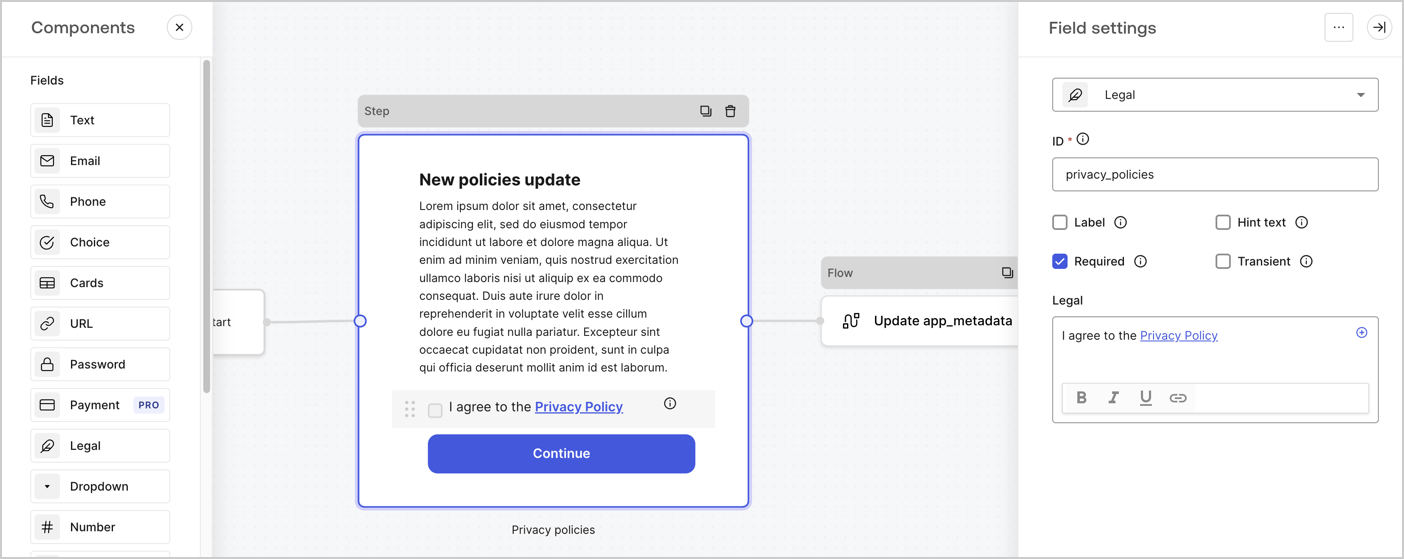
The Step node is the graphical interface visible to users. Add [Fields](/docs/customize/forms/nodes-and-components) to the Step node to collect the new agreement acceptance value by following these steps:

1. Drag a **Rich text** field from the **Components menu** into the **Step** node.

   * **Rich text**: Enter a description of your privacy policies updates.
   * Select **Save**.
2. Drag a **Legal** field into the **Step** node.

   * **ID**: Enter `privacy_policies`.
   * **Required**: Enable the checkbox.
   * **Legal**: Enter `I agree to the Privacy Policy`.
   * Select **Save**.
3. Select **Publish** to save.
<Frame>
  <img src="https://mintcdn.com/docs-dev-ai-docs-migration/7lWugLL1YqM3O3Ve/docs/images/cdy7uua7fh8z/59zFFjQjAnjogkc2QGIqqJ/0ad66b1b636544122aa4e65968b76c2c/privacy-policy-step-node.png?fit=max&auto=format&n=7lWugLL1YqM3O3Ve&q=85&s=bcc1fc64cdb4d3ab2823d2ce0319d22c" alt="Dashboard > Actions > Forms > Use case privacy policy step node" data-og-width="1404" width="1404" data-og-height="559" height="559" data-path="docs/images/cdy7uua7fh8z/59zFFjQjAnjogkc2QGIqqJ/0ad66b1b636544122aa4e65968b76c2c/privacy-policy-step-node.png" data-optimize="true" data-opv="3" srcset="https://mintcdn.com/docs-dev-ai-docs-migration/7lWugLL1YqM3O3Ve/docs/images/cdy7uua7fh8z/59zFFjQjAnjogkc2QGIqqJ/0ad66b1b636544122aa4e65968b76c2c/privacy-policy-step-node.png?w=280&fit=max&auto=format&n=7lWugLL1YqM3O3Ve&q=85&s=87ea2215b9043fa10d6e723b6ccc2a78 280w, https://mintcdn.com/docs-dev-ai-docs-migration/7lWugLL1YqM3O3Ve/docs/images/cdy7uua7fh8z/59zFFjQjAnjogkc2QGIqqJ/0ad66b1b636544122aa4e65968b76c2c/privacy-policy-step-node.png?w=560&fit=max&auto=format&n=7lWugLL1YqM3O3Ve&q=85&s=2bea78a1e7b30620f69f06339a95fa6a 560w, https://mintcdn.com/docs-dev-ai-docs-migration/7lWugLL1YqM3O3Ve/docs/images/cdy7uua7fh8z/59zFFjQjAnjogkc2QGIqqJ/0ad66b1b636544122aa4e65968b76c2c/privacy-policy-step-node.png?w=840&fit=max&auto=format&n=7lWugLL1YqM3O3Ve&q=85&s=14075980e564b234a60a1c65af4fd8f5 840w, https://mintcdn.com/docs-dev-ai-docs-migration/7lWugLL1YqM3O3Ve/docs/images/cdy7uua7fh8z/59zFFjQjAnjogkc2QGIqqJ/0ad66b1b636544122aa4e65968b76c2c/privacy-policy-step-node.png?w=1100&fit=max&auto=format&n=7lWugLL1YqM3O3Ve&q=85&s=c01f35f2fdc0b9f26fdc254fd55a6bdd 1100w, https://mintcdn.com/docs-dev-ai-docs-migration/7lWugLL1YqM3O3Ve/docs/images/cdy7uua7fh8z/59zFFjQjAnjogkc2QGIqqJ/0ad66b1b636544122aa4e65968b76c2c/privacy-policy-step-node.png?w=1650&fit=max&auto=format&n=7lWugLL1YqM3O3Ve&q=85&s=032b52514a70bf8712c59c467924d40d 1650w, https://mintcdn.com/docs-dev-ai-docs-migration/7lWugLL1YqM3O3Ve/docs/images/cdy7uua7fh8z/59zFFjQjAnjogkc2QGIqqJ/0ad66b1b636544122aa4e65968b76c2c/privacy-policy-step-node.png?w=2500&fit=max&auto=format&n=7lWugLL1YqM3O3Ve&q=85&s=9fad5859eb7751eb0119605310fcc111 2500w" />
</Frame>

### Configure the Flow node

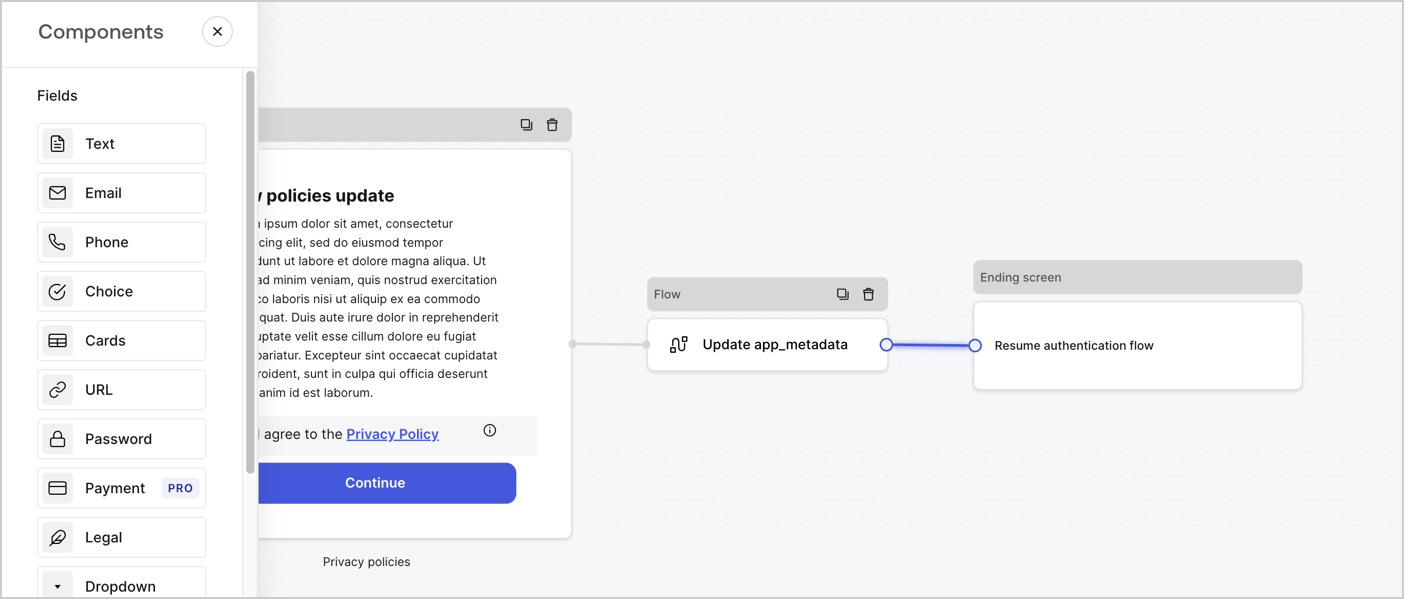
Add a **Flow** node after the **Step** node to update the `app_metadata` and resume the authentication flow by following these steps:

1. Select **Flow** from the bottom of the Form editor.
2. Remove the existing link between the **Step** and **Ending Screen** nodes.
3. Select the new **Flow** > **Click to add a flow** > **Create a new flow.**

   * Enter `Update app_metadata` in the **Name** field.
   * Select **Create**.
   * Select **Save**.
4. Link the **Flow** node to the **Step** and **Ending Screen** nodes as pictured below.
5. Select **Publish** to save.
<Frame>
  <img src="https://mintcdn.com/docs-dev-ai-docs-migration/9lfzm79c_QXHtQNy/docs/images/cdy7uua7fh8z/6YIkzm7SrpM9LW76AXuRzh/353c518fe82bbaa440836da1d83596d6/link-policies.png?fit=max&auto=format&n=9lfzm79c_QXHtQNy&q=85&s=82a4bb6777105be1e97d33d478722cd7" alt="Dashboard > Actions > Forms > Form" data-og-width="1404" width="1404" data-og-height="599" height="599" data-path="docs/images/cdy7uua7fh8z/6YIkzm7SrpM9LW76AXuRzh/353c518fe82bbaa440836da1d83596d6/link-policies.png" data-optimize="true" data-opv="3" srcset="https://mintcdn.com/docs-dev-ai-docs-migration/9lfzm79c_QXHtQNy/docs/images/cdy7uua7fh8z/6YIkzm7SrpM9LW76AXuRzh/353c518fe82bbaa440836da1d83596d6/link-policies.png?w=280&fit=max&auto=format&n=9lfzm79c_QXHtQNy&q=85&s=fbb61bd959c46eb2fc4e0999a6ad374d 280w, https://mintcdn.com/docs-dev-ai-docs-migration/9lfzm79c_QXHtQNy/docs/images/cdy7uua7fh8z/6YIkzm7SrpM9LW76AXuRzh/353c518fe82bbaa440836da1d83596d6/link-policies.png?w=560&fit=max&auto=format&n=9lfzm79c_QXHtQNy&q=85&s=0a2f46ecf08eb191c61284e2c8c9ec5d 560w, https://mintcdn.com/docs-dev-ai-docs-migration/9lfzm79c_QXHtQNy/docs/images/cdy7uua7fh8z/6YIkzm7SrpM9LW76AXuRzh/353c518fe82bbaa440836da1d83596d6/link-policies.png?w=840&fit=max&auto=format&n=9lfzm79c_QXHtQNy&q=85&s=2de819632de4cefb931e74b5ee8b7357 840w, https://mintcdn.com/docs-dev-ai-docs-migration/9lfzm79c_QXHtQNy/docs/images/cdy7uua7fh8z/6YIkzm7SrpM9LW76AXuRzh/353c518fe82bbaa440836da1d83596d6/link-policies.png?w=1100&fit=max&auto=format&n=9lfzm79c_QXHtQNy&q=85&s=9f9e8ada8abd24fd18cee56147d38426 1100w, https://mintcdn.com/docs-dev-ai-docs-migration/9lfzm79c_QXHtQNy/docs/images/cdy7uua7fh8z/6YIkzm7SrpM9LW76AXuRzh/353c518fe82bbaa440836da1d83596d6/link-policies.png?w=1650&fit=max&auto=format&n=9lfzm79c_QXHtQNy&q=85&s=61ac31ebdaf1ce16fd4bea9708ea18da 1650w, https://mintcdn.com/docs-dev-ai-docs-migration/9lfzm79c_QXHtQNy/docs/images/cdy7uua7fh8z/6YIkzm7SrpM9LW76AXuRzh/353c518fe82bbaa440836da1d83596d6/link-policies.png?w=2500&fit=max&auto=format&n=9lfzm79c_QXHtQNy&q=85&s=e2098ecdd00f26ec5e49e895e93e228c 2500w" />
</Frame>

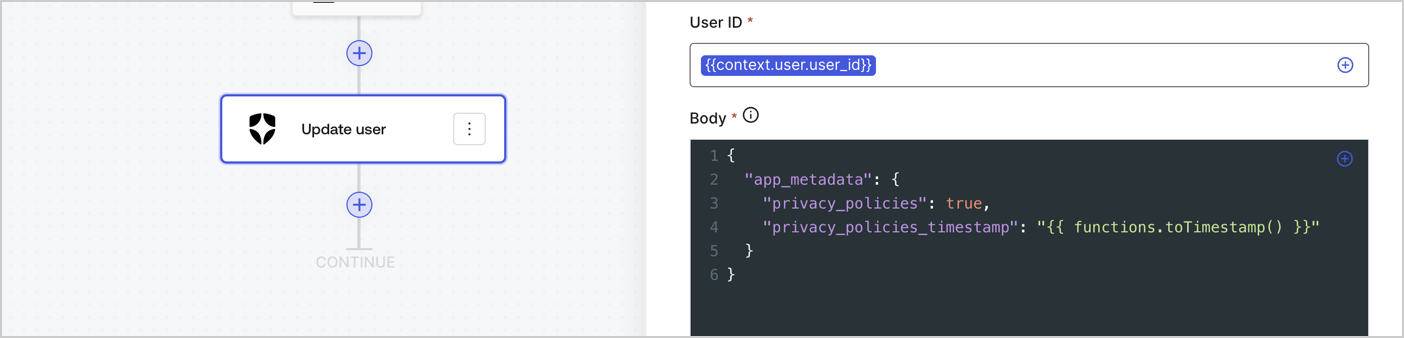
Add an Auth0 Update user action to the flow by following these steps:

1. Select the **Flow** **Update app\_metadata** > **Edit flow** to open the Flow editor in a new tab.
2. Below the StartAction, select the **+** icon to add an **Update user** action. Complete the fields below, then select **Save** to continue.

   * **Connection**: Select from the dropdown the Vault connection to your M2M application.

   * **User ID**: Enter `{{context.user.user_id}}`.

   * **Body**: Copy and paste the following code to update the app\_metadata with the privacy\_policies and privacy\_policies\_timestamp properties.

     ```text lines theme={null}
     {
       "app_metadata": {
         "privacy_policies": true,
         "privacy_policies_timestamp": "{{ functions.toTimestamp() }}"
       }
     }
     ```

   * Select **Save**.
3. Select **Publish** to save.
<Frame>
  <img src="https://mintcdn.com/docs-dev-ai-docs-migration/74qrQQru_5gTtEmD/docs/images/cdy7uua7fh8z/CvMNIwWrOUwaFW4X3G28p/1fb70ae57a20749d9ffaaba8dc0b7e26/update-user-privacy.png?fit=max&auto=format&n=74qrQQru_5gTtEmD&q=85&s=59953b1909b4bbe0e7cce460793d1230" alt="Dashboard > Actions > Forms > User case privacy policy code" data-og-width="1404" width="1404" data-og-height="338" height="338" data-path="docs/images/cdy7uua7fh8z/CvMNIwWrOUwaFW4X3G28p/1fb70ae57a20749d9ffaaba8dc0b7e26/update-user-privacy.png" data-optimize="true" data-opv="3" srcset="https://mintcdn.com/docs-dev-ai-docs-migration/74qrQQru_5gTtEmD/docs/images/cdy7uua7fh8z/CvMNIwWrOUwaFW4X3G28p/1fb70ae57a20749d9ffaaba8dc0b7e26/update-user-privacy.png?w=280&fit=max&auto=format&n=74qrQQru_5gTtEmD&q=85&s=11797292042ad9e1df72222f23db5c31 280w, https://mintcdn.com/docs-dev-ai-docs-migration/74qrQQru_5gTtEmD/docs/images/cdy7uua7fh8z/CvMNIwWrOUwaFW4X3G28p/1fb70ae57a20749d9ffaaba8dc0b7e26/update-user-privacy.png?w=560&fit=max&auto=format&n=74qrQQru_5gTtEmD&q=85&s=af7162d10dad2777337eb002d58c0d35 560w, https://mintcdn.com/docs-dev-ai-docs-migration/74qrQQru_5gTtEmD/docs/images/cdy7uua7fh8z/CvMNIwWrOUwaFW4X3G28p/1fb70ae57a20749d9ffaaba8dc0b7e26/update-user-privacy.png?w=840&fit=max&auto=format&n=74qrQQru_5gTtEmD&q=85&s=271bc1b98bd4dd99b7e447edb7218e9f 840w, https://mintcdn.com/docs-dev-ai-docs-migration/74qrQQru_5gTtEmD/docs/images/cdy7uua7fh8z/CvMNIwWrOUwaFW4X3G28p/1fb70ae57a20749d9ffaaba8dc0b7e26/update-user-privacy.png?w=1100&fit=max&auto=format&n=74qrQQru_5gTtEmD&q=85&s=a81543485dfb62f65d08ef0405c9cda0 1100w, https://mintcdn.com/docs-dev-ai-docs-migration/74qrQQru_5gTtEmD/docs/images/cdy7uua7fh8z/CvMNIwWrOUwaFW4X3G28p/1fb70ae57a20749d9ffaaba8dc0b7e26/update-user-privacy.png?w=1650&fit=max&auto=format&n=74qrQQru_5gTtEmD&q=85&s=dba2556809789ae8a8022ad6a4d38ffd 1650w, https://mintcdn.com/docs-dev-ai-docs-migration/74qrQQru_5gTtEmD/docs/images/cdy7uua7fh8z/CvMNIwWrOUwaFW4X3G28p/1fb70ae57a20749d9ffaaba8dc0b7e26/update-user-privacy.png?w=2500&fit=max&auto=format&n=74qrQQru_5gTtEmD&q=85&s=40c41499aa99c93fb1c41ada86d252f6 2500w" />
</Frame>

<Callout icon="file-lines" color="#0EA5E9" iconType="regular">
  The flow **Update app\_metadata** adds a `privacy_policies true` value to the app`_metadata` object and also generates a timestamp with a [helper function.](/docs/customize/forms/variables)
</Callout>

## Retrieve the form render code

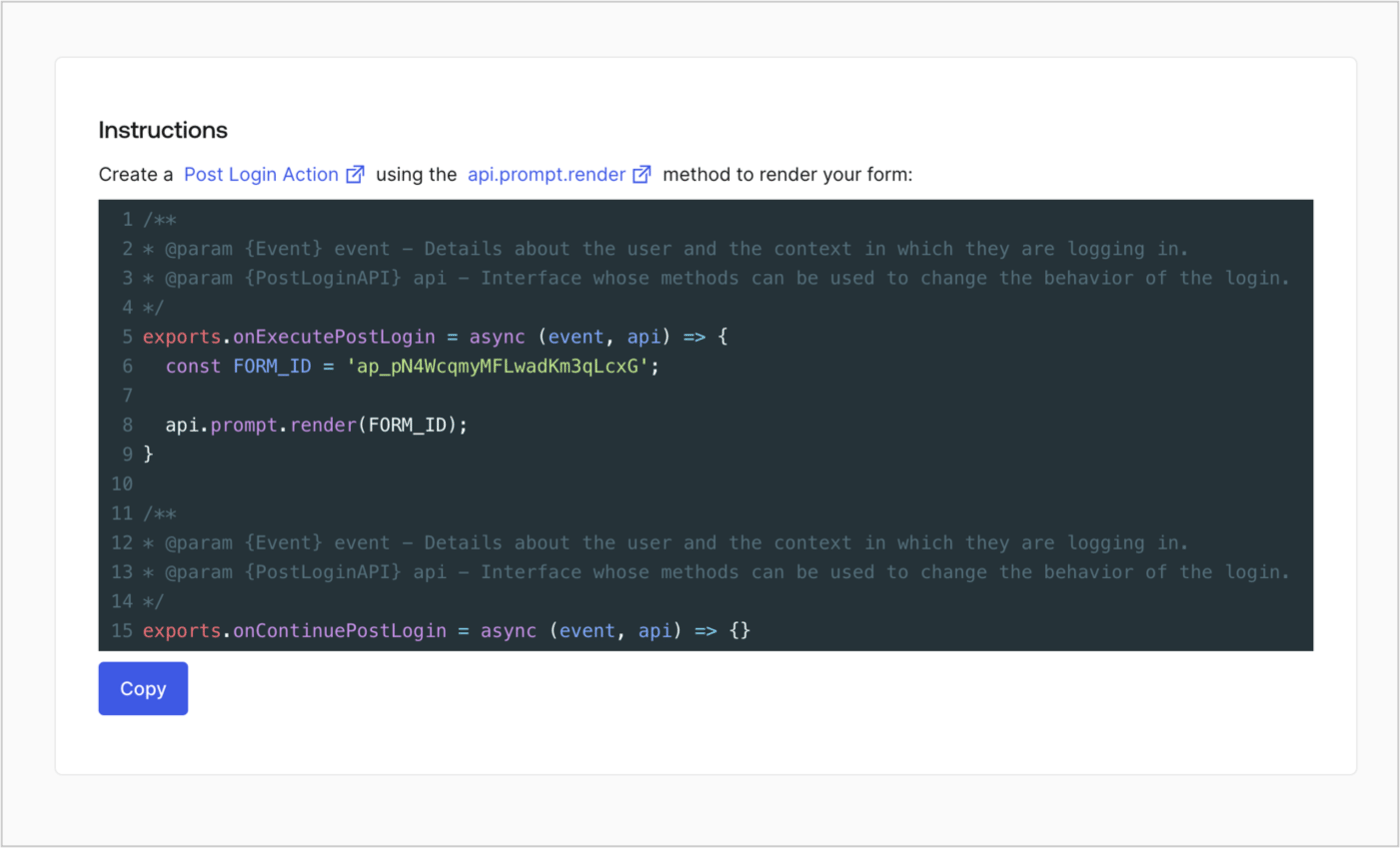
Retrieve your form render code to visually render the form with a custom Post Login Action by following these steps:

* From the Form editor, select **`<> Render`**.
* Select **Copy**.
<Frame>
  <img src="https://mintcdn.com/docs-dev-ai-docs-migration/Qf1bRe1KVQBLsiEu/docs/images/cdy7uua7fh8z/2EIUzc539sq9lwoTKbjoJv/496a864c0fc44a782c9cadca119dbfb0/embed.png?fit=max&auto=format&n=Qf1bRe1KVQBLsiEu&q=85&s=2d282be6bed5c583023281bb2f302691" alt="Dashboard > Actions > Forms > Form > Embed" data-og-width="1400" width="1400" data-og-height="848" height="848" data-path="docs/images/cdy7uua7fh8z/2EIUzc539sq9lwoTKbjoJv/496a864c0fc44a782c9cadca119dbfb0/embed.png" data-optimize="true" data-opv="3" srcset="https://mintcdn.com/docs-dev-ai-docs-migration/Qf1bRe1KVQBLsiEu/docs/images/cdy7uua7fh8z/2EIUzc539sq9lwoTKbjoJv/496a864c0fc44a782c9cadca119dbfb0/embed.png?w=280&fit=max&auto=format&n=Qf1bRe1KVQBLsiEu&q=85&s=b1783090a30d67c9e40c68d79c9b1358 280w, https://mintcdn.com/docs-dev-ai-docs-migration/Qf1bRe1KVQBLsiEu/docs/images/cdy7uua7fh8z/2EIUzc539sq9lwoTKbjoJv/496a864c0fc44a782c9cadca119dbfb0/embed.png?w=560&fit=max&auto=format&n=Qf1bRe1KVQBLsiEu&q=85&s=64700cd1a6149f383e689f62c7d20280 560w, https://mintcdn.com/docs-dev-ai-docs-migration/Qf1bRe1KVQBLsiEu/docs/images/cdy7uua7fh8z/2EIUzc539sq9lwoTKbjoJv/496a864c0fc44a782c9cadca119dbfb0/embed.png?w=840&fit=max&auto=format&n=Qf1bRe1KVQBLsiEu&q=85&s=ba0fcbc4d25c9acd33a71f1ee717fdd1 840w, https://mintcdn.com/docs-dev-ai-docs-migration/Qf1bRe1KVQBLsiEu/docs/images/cdy7uua7fh8z/2EIUzc539sq9lwoTKbjoJv/496a864c0fc44a782c9cadca119dbfb0/embed.png?w=1100&fit=max&auto=format&n=Qf1bRe1KVQBLsiEu&q=85&s=cf39e6c4a2d434d62546e9b2682b752b 1100w, https://mintcdn.com/docs-dev-ai-docs-migration/Qf1bRe1KVQBLsiEu/docs/images/cdy7uua7fh8z/2EIUzc539sq9lwoTKbjoJv/496a864c0fc44a782c9cadca119dbfb0/embed.png?w=1650&fit=max&auto=format&n=Qf1bRe1KVQBLsiEu&q=85&s=8ae0fda2c8d93ed9ab50b22abe07e358 1650w, https://mintcdn.com/docs-dev-ai-docs-migration/Qf1bRe1KVQBLsiEu/docs/images/cdy7uua7fh8z/2EIUzc539sq9lwoTKbjoJv/496a864c0fc44a782c9cadca119dbfb0/embed.png?w=2500&fit=max&auto=format&n=Qf1bRe1KVQBLsiEu&q=85&s=27efea1ce31b89a4c9c85443f195dd3c 2500w" />
</Frame>

## Create a Post Login Action

Create a post-login Action to render your form by following these steps:

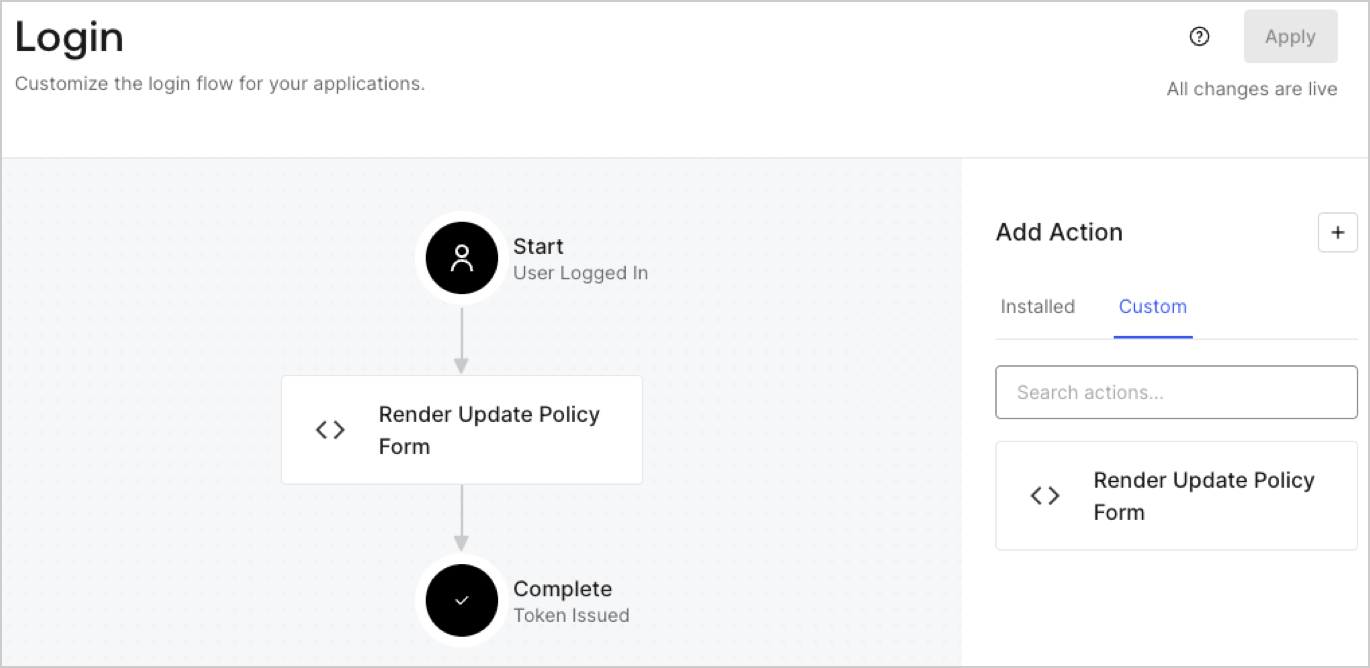
1. Navigate to **Auth0 Dashboard > Actions > Flows > Login.**
2. Select the **+** icon and Select **Build from scratch**:

   * **Name**: Enter `Render Update Policy Form`.
   * **Trigger**: Select `Login / Post Login`.
   * **Runtime**: Select the recommended version.
3. Select **Create**.

To configure the post-login Action:

1. Delete the existing code from the Code editor.
2. Paste the form render code into the Code editor.
3. Edit the code to define the conditional logic that will render the form.

   ```javascript lines theme={null}
   /**
   * @param {Event} event - Details about the user and the context in which they are logging in.
   * @param {PostLoginAPI} api - Interface whose methods can be used to change the behavior of the login.
   */
   exports.onExecutePostLogin = async (event, api) => {
     const FORM_ID = 'REPLACE_WITH_YOUR_FORM_ID';

     if (event.user.app_metadata.privacy_policies !== true) {
       api.prompt.render(FORM_ID);
     }
   }

   exports.onContinuePostLogin = async (event, api) => { }
   ```

   <Callout icon="file-lines" color="#0EA5E9" iconType="regular">
     The example code above will render the form when a user is missing the app metadata `privacy_policies` property.
   </Callout>
4. Select **Deploy.**
5. Drag and Drop the **Render Update Policy Form** Action to the **Login** flow.
   <Frame>
     <img src="https://mintcdn.com/docs-dev-ai-docs-migration/7lWugLL1YqM3O3Ve/docs/images/cdy7uua7fh8z/5TOwDgevZsBqd7yZynUYWU/41ca909dc3007aed4f40ff794a05efa5/postlogin.png?fit=max&auto=format&n=7lWugLL1YqM3O3Ve&q=85&s=75c3238aa68431e78962f3531fed440f" alt="Dashboard > Forms > Use Case > Render update policy form login action" data-og-width="1370" width="1370" data-og-height="668" height="668" data-path="docs/images/cdy7uua7fh8z/5TOwDgevZsBqd7yZynUYWU/41ca909dc3007aed4f40ff794a05efa5/postlogin.png" data-optimize="true" data-opv="3" srcset="https://mintcdn.com/docs-dev-ai-docs-migration/7lWugLL1YqM3O3Ve/docs/images/cdy7uua7fh8z/5TOwDgevZsBqd7yZynUYWU/41ca909dc3007aed4f40ff794a05efa5/postlogin.png?w=280&fit=max&auto=format&n=7lWugLL1YqM3O3Ve&q=85&s=f3f172bd9e85c79e5351d88c485f0321 280w, https://mintcdn.com/docs-dev-ai-docs-migration/7lWugLL1YqM3O3Ve/docs/images/cdy7uua7fh8z/5TOwDgevZsBqd7yZynUYWU/41ca909dc3007aed4f40ff794a05efa5/postlogin.png?w=560&fit=max&auto=format&n=7lWugLL1YqM3O3Ve&q=85&s=19f97824a61830a2886c17f04642794f 560w, https://mintcdn.com/docs-dev-ai-docs-migration/7lWugLL1YqM3O3Ve/docs/images/cdy7uua7fh8z/5TOwDgevZsBqd7yZynUYWU/41ca909dc3007aed4f40ff794a05efa5/postlogin.png?w=840&fit=max&auto=format&n=7lWugLL1YqM3O3Ve&q=85&s=d52e9f1358048e3530bc34d84c990ba6 840w, https://mintcdn.com/docs-dev-ai-docs-migration/7lWugLL1YqM3O3Ve/docs/images/cdy7uua7fh8z/5TOwDgevZsBqd7yZynUYWU/41ca909dc3007aed4f40ff794a05efa5/postlogin.png?w=1100&fit=max&auto=format&n=7lWugLL1YqM3O3Ve&q=85&s=623b7ca0ecf10ce92e68b0b88e78f038 1100w, https://mintcdn.com/docs-dev-ai-docs-migration/7lWugLL1YqM3O3Ve/docs/images/cdy7uua7fh8z/5TOwDgevZsBqd7yZynUYWU/41ca909dc3007aed4f40ff794a05efa5/postlogin.png?w=1650&fit=max&auto=format&n=7lWugLL1YqM3O3Ve&q=85&s=c6635904f6fb31407d6ea182e000e318 1650w, https://mintcdn.com/docs-dev-ai-docs-migration/7lWugLL1YqM3O3Ve/docs/images/cdy7uua7fh8z/5TOwDgevZsBqd7yZynUYWU/41ca909dc3007aed4f40ff794a05efa5/postlogin.png?w=2500&fit=max&auto=format&n=7lWugLL1YqM3O3Ve&q=85&s=f085a7b0bf0e53e4036d75404df0d246 2500w" />
   </Frame>
6. Select **Apply.**

### Test implementation

Test the implementation by following these steps:

1. Log in with an existing user whose app`_metadata` attribute `privacy_policies` does not have a value.
2. The post-login Action in the Login flow will render the form and prompt for acceptance.
3. Select **Auth0 Dashboard > User Management > Users,** locate the user and verify that the `app_metadata` attribute `privacy_policies` contains a `true` value and a timestamp.
